Original implementation guide · Content version: · Sources
Download three-language preparation and acceptance templates, synthetic inputs, a runnable control example and observed execution receipts.
Choose a business outcome before a technology checklist
A pilot needs one outcome that a team can use: a customer brief, a quote draft or a verified handoff. Name the business object, its sources, the person approving the result and the destination. The kit translates those decisions into preparation, field-mapping and acceptance worksheets. It is an authored reference resource, not evidence that any particular customer has used or accepted this workflow.
Use the preparation and mapping worksheets together
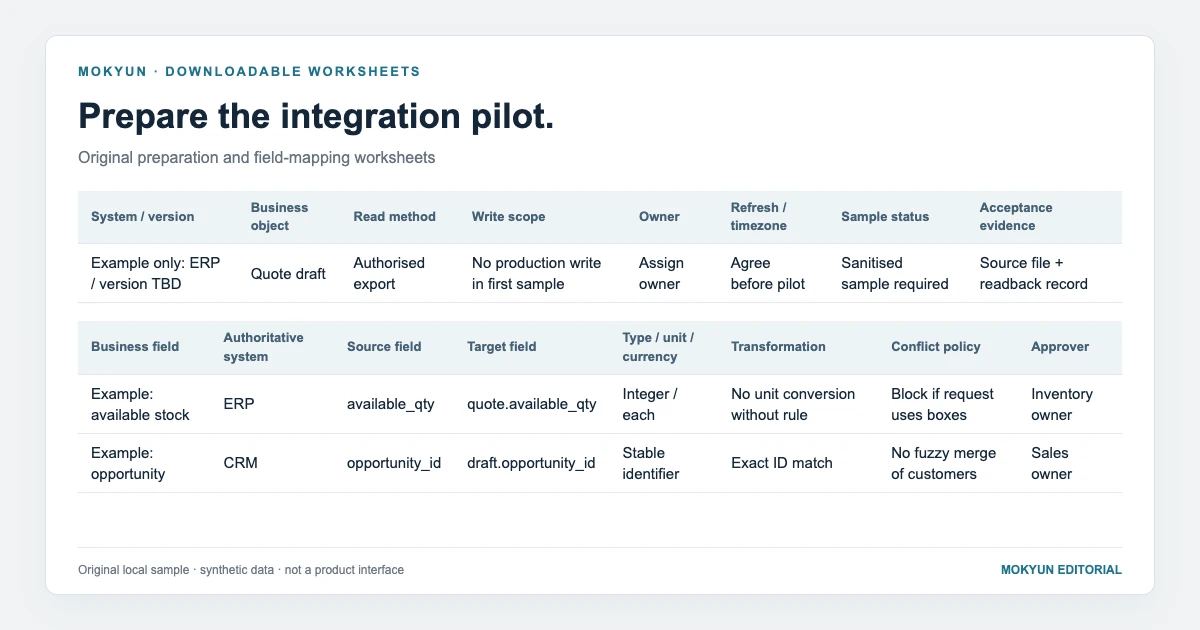
The preparation sheet records system version, access method, permitted writes, ownership and refresh requirements. The mapping sheet assigns authority to business fields and defines units, currencies and conflict rules. Example rows are clearly marked. Replace them with your own reviewed information; an empty owner or unknown version is an unresolved condition, not a pass. Initial discussion should use sanitised samples rather than credentials or customer records.
Run the included example locally
The downloadable Python program needs only the standard library. It reads four synthetic enquiries and one catalogue row, then uses temporary SQLite as its destination. Run python3 run-demo.py from the extracted folder. It does not access a network, call an AI model or modify an ERP. A fixture flag represents approval so the order of controls can be inspected without claiming real identity management.
Inspect what actually happened
The observed run produced one draft for two items at USD 125.50 each, totalling USD 251.00. Before approval the write was blocked. An identical retry reused the existing record; a changed payload with the same key was rejected. Three other enquiries were blocked for unit conflict, currency conflict and insufficient stock. The receipt includes input and runner hashes so a reviewer can rerun and compare the result.
Keep untested conditions visible
The acceptance worksheet also includes an uncertain-response case. That condition is a proposed project test, not something this local program proves: the sample has no network timeout, concurrent workers or production approval service. Real integration acceptance should add permission denial, changed source versions and destination failure using the target environment. Never turn an unexecuted template row into evidence by copying a successful status from another case.
Turn the evidence into a first implementation scope
Review the filled worksheets with business and system owners. Identify what can proceed, which dependencies need work and which actions remain manual. Agree how drafts will be used, who resolves exceptions and how a stored result will be verified. Mokyun AI uses this scope to discuss an enterprise workflow on existing systems. The video below replays the local execution results; it is not a product-interface recording or a customer performance claim.
Downloads and related guides
- Integration preparation worksheet (CSV)
- Field-authority and mapping worksheet (CSV)
- Pilot acceptance checklist (CSV)
- Download the reproducible example and all templates (ZIP)
- Observed execution receipts and file hashes (JSON)
- AI integration for legacy systems without APIs: choose a workable handoff
- Enterprise AI write-back: approvals, duplicate requests and verified outcomes
- ERP and CRM data conflicts: what enterprise AI should verify before preparing a quote
- RAG, RPA and enterprise AI agents: choose by the business outcome you need
Sources
- Mokyun local example: execution receipts and scope
Source published: · Accessed:
- AWS: Idempotent request handling
Accessed:
Mokyun Editorial · neo@mokyun.com