Original implementation guide · Content version: · Sources
Evaluate exports, read-only views, staging tables and authorised interface automation before connecting a legacy system to an enterprise AI workflow.

Start with the record your team needs
A sales team needs a customer enquiry, the current product record and available stock to prepare a response. That does not require exposing the whole ERP. Identify one business object and its stable key, then list the fields the next person needs. This turns a vague request to connect a legacy system into a bounded access decision with an owner, a refresh rule and an observable output.
Choose a connection path in order
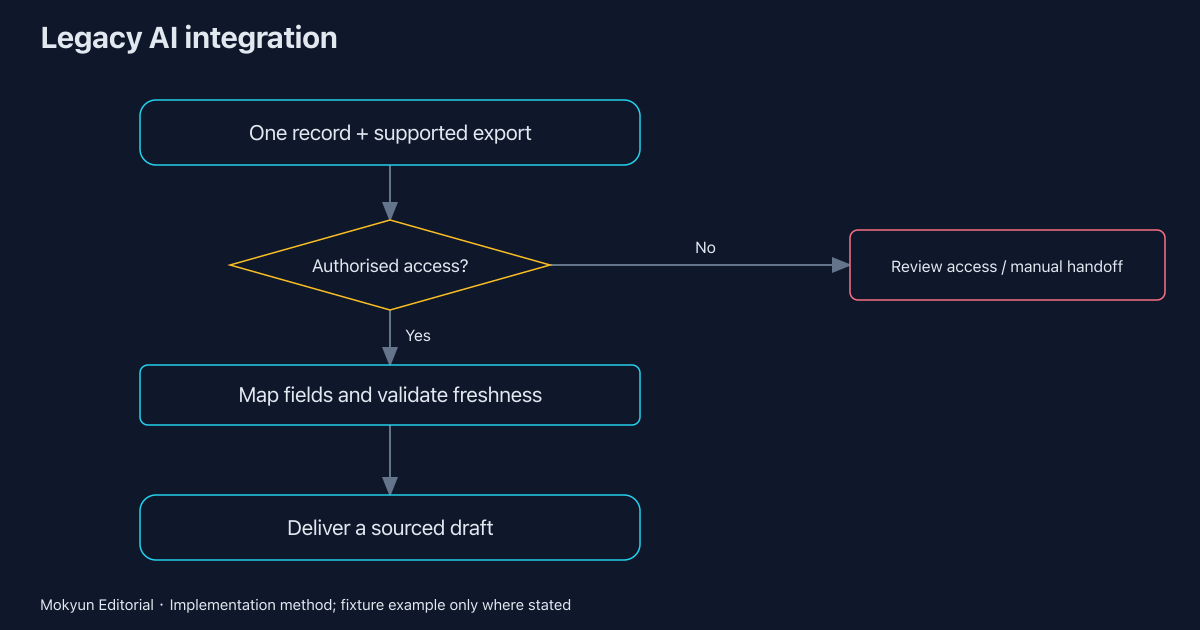
First inspect supported exports and existing interfaces. An authorised CSV export may be enough for a bounded preparation task if its age and owner remain visible. A read-only database view or staging table may provide a more repeatable handoff when the system owner can support it. Interface automation is a further option for tasks that must use the existing screen; it is not a reason to bypass authentication.
Treat screen automation as an operational dependency
A screen flow depends on element selectors, user permissions, login state and application changes. Agree what happens when a field moves, a session expires or a confirmation is ambiguous. Microsoft documents selector-based UI automation; that supports the general method, not a claim that Mokyun has tested your application. Keep screenshots or logs of the selected business record, and route failed recognition to a responsible person.
Separate reading from changing business records
Begin with read access and a draft deliverable. For quote preparation, show the source record, unit, currency, version and missing conditions. A person can use this material before any system write is introduced. Adding a write later requires a target record, permitted fields, approval rules and readback. A technical connection should never silently become permission to create orders, change prices or make customer commitments.
Use a reproducible sample before expanding
The linked local example reads synthetic CSV enquiries and a catalogue, checks units, currency and stock, and stores one approved draft in temporary SQLite. It blocks three invalid requests and reuses the result of a duplicate request. This proves the sample control path ran. It does not prove a live ERP connector, an AI model or a customer deployment. Keep that distinction when using the example in an internal review.
Make the next decision concrete
Bring the system name and version, an authorised sample export, a field owner, an update schedule and the desired deliverable to the integration discussion. If access cannot be supported, retain a manual handoff while resolving the dependency. Mokyun AI scopes the first work chain around these conditions, preserving the existing system where feasible. The preparation and mapping templates below make missing conditions visible before an implementation commitment.
Downloads and related guides
- Integration preparation worksheet (CSV)
- Field-authority and mapping worksheet (CSV)
- Pilot acceptance checklist (CSV)
- Download the reproducible example and all templates (ZIP)
- Observed execution receipts and file hashes (JSON)
- Enterprise AI write-back: approvals, duplicate requests and verified outcomes
- ERP and CRM data conflicts: what enterprise AI should verify before preparing a quote
- Enterprise AI integration pilot kit: preparation, field mapping and acceptance evidence
- RAG, RPA and enterprise AI agents: choose by the business outcome you need
Sources
- Mokyun local example: execution receipts and scope
Source published: · Accessed:
- Microsoft: UI elements in desktop flows
Accessed:
Mokyun Editorial · neo@mokyun.com