Original implementation guide · Content version: · Sources
Define field authority, identifiers, versions, units and currencies before combining business records into AI-generated quote materials.
One enquiry can expose several meanings of truth
CRM may describe what a customer asked for, ERP may record available stock, and a spreadsheet may hold a negotiated price. These records answer different questions. A useful AI workflow does not choose one system as universally correct. It defines which source owns each business field, how current that field must be and who resolves a disagreement before a customer-facing result is prepared.
Match business identifiers before interpreting text
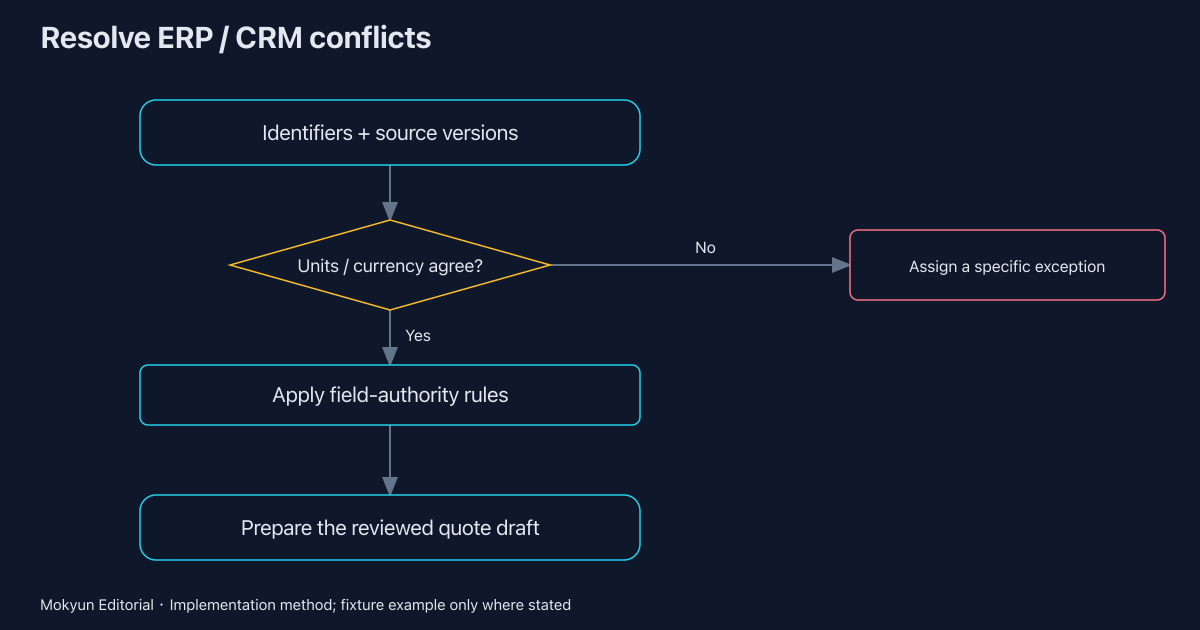
Begin with customer, product and opportunity identifiers. Similar names can refer to different legal entities or product variants. Keep the original identifiers alongside a mapped key and its owner. If matching is uncertain, produce a review item instead of silently merging records. An incorrect join can create a plausible quote from individually valid facts, which is harder to detect than an obviously missing document.
Check units, currency and effective versions
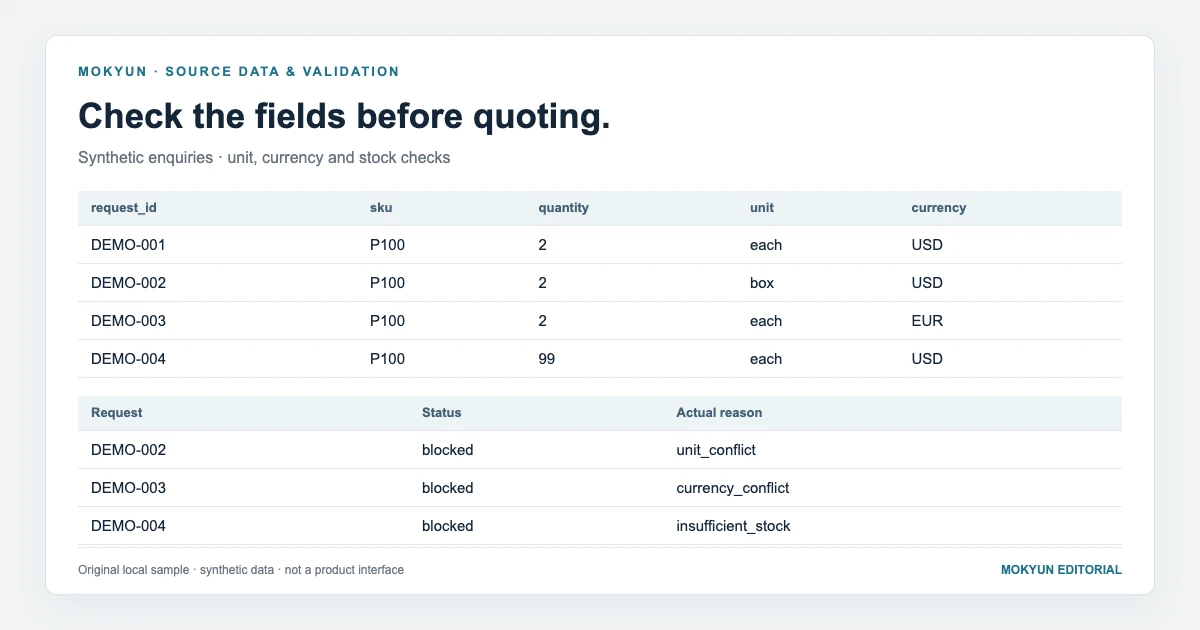
A quantity in boxes cannot be multiplied by a price per item without an agreed conversion. A price in USD cannot be presented as EUR because the customer requested euros. Record the price version, valid period and any approved conversion rule. The downloadable example blocks a unit mismatch and a currency mismatch; it deliberately does not infer exchange rates or packaging conversions from free text.
Keep freshness separate from authority
A newer CRM note may contain an unapproved estimate, while an older controlled catalogue may remain the effective price source. Compare validity and approval state, not timestamps alone. Define which source can override which field and when that rule expires. Salesforce explains grounding as using relevant trusted data; deciding who owns a particular conflicting business value still requires enterprise rules and accountable people.
Return an exception that someone can resolve
A conflict report should name the business record, competing values, sources, versions and the decision required. Assign it to the person who can change the authoritative record or approve an exception. Keep the quote as a draft while the issue remains open. A general warning that data may be inaccurate is much less useful than a specific instruction to confirm whether a quantity is twelve items or twelve boxes.
Accept the workflow on both normal and conflicting samples
Use a valid enquiry, a unit conflict, a currency conflict and an insufficient-stock case in the first review. Confirm that the output preserves sources and stops where rules require a decision. The local control example accepts one draft and blocks three synthetic requests. Mokyun AI uses this kind of bounded business-object analysis to scope integration; actual source authority and supported systems must be agreed for the engagement.
Downloads and related guides
- Integration preparation worksheet (CSV)
- Field-authority and mapping worksheet (CSV)
- Pilot acceptance checklist (CSV)
- Download the reproducible example and all templates (ZIP)
- Observed execution receipts and file hashes (JSON)
- AI integration for legacy systems without APIs: choose a workable handoff
- Enterprise AI write-back: approvals, duplicate requests and verified outcomes
- Enterprise AI integration pilot kit: preparation, field mapping and acceptance evidence
- RAG, RPA and enterprise AI agents: choose by the business outcome you need
Sources
- Mokyun local example: execution receipts and scope
Source published: · Accessed:
- Salesforce Trailhead: Grounding agents with data
Accessed:
Mokyun Editorial · neo@mokyun.com